IP Address Setup#
Warning
The section below is “a rough description from the back of [Tobi’s] head. The general idea is correct, but details may vary…” We plan to elaborate the documentation here and add relevant references. In the meanwhile, please contact Tobi or Geet before meddling with the switches or IP properties.
The problem#
The HALO user network uses the same IP-Range as the AVAPS-Internal Radio and Dropsonde interfaces (192.168.1.0/24). The AVAPS-Internal addresses are hard-coded in their firmware and almost impossible to change. The HALO user network is used by many and changing it would potentially influence a lot of complicated systems (although it might be reasonable to change the HALO user network to a bigger address space to avoid conflicts in future). A computer (specifically, the AVAPS Computer) uses IP-Addresses to talk to other devices on a network. The computer must know over which network card a packet should be sent, based on the target IP address. This requires to have distinct IP ranges (subnets) on each network card, which is (at first sight) incompatible with having two separate networks on the same IP range.
|
|---|
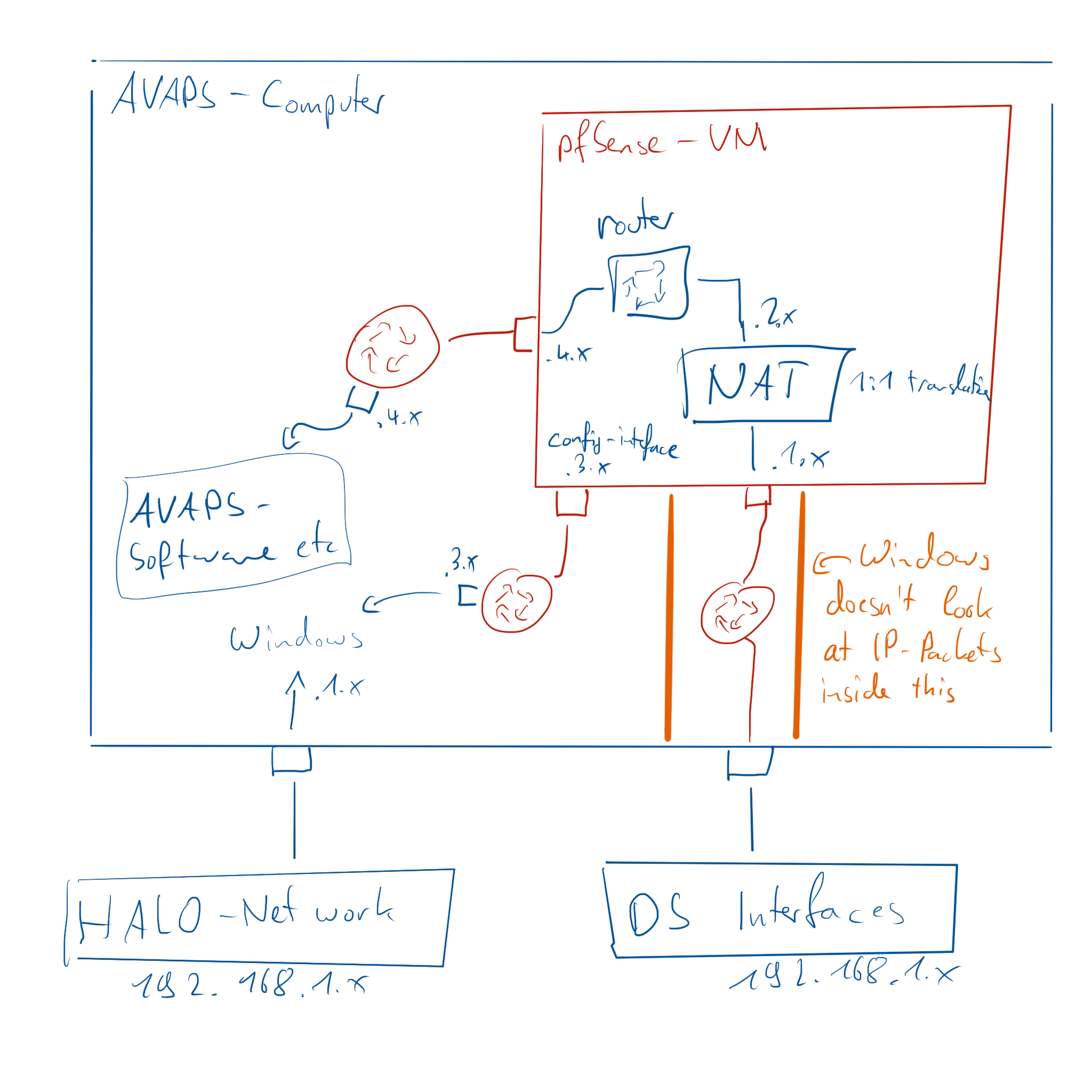
AVAPS Network Conceptual Sketch (courtesy: Tobias Kölling) |
The workaround#
IP packets are just a bunch of bytes. It is possible to modify them while passing through some program. Thus, it should be possible to put something in between the AVAPS computer system (Windows) and the Radio and Dropsonde interfaces which rewrites the IP-Addresses within each and every data packet passing through. That way, it would be possible to pretend that the IP-Addresses of the Radio and Dropsonde interfaces would have been changed. This process is called Network Address Translation, a process with every home internet router does.
However, while home routers translate all internal IP-addresses to a single external IP address, we want to use 1:1 NAT, that is we want to have a set of IP addresses (here 192.168.2.x) visible to the Windows machine translated to a matching set of IP addresses (192.168.1.x) for the Dropsonde interfaces in order to still have unhindered bi-directional communication between all devices.
The implementation#
The IP packets of the Dropsonde interfaces may not be seen by the Windows machine prior to address translation (otherwise the same address confusion we want to solve would occur), so we need a separate machine to do this. Fortunately, Windows 10 includes Hyper-V which enables setting up Virtual Networks and Virtual Computers. We use these capabilities to run a pfSense firewall in a virtual machine, which is capable of 1:1 NAT. We connect this firewall using virtual Hyper-V switches to both, the external (physical) network card to the Radio and Dropsonde Interfaces as well as to the Windows machine.
One caveat remains: we can’t easily use the 192.168.2.x network addresses directly on the windows machine, because we need to teach the windows machine that traffic towards those addresses need to go through the pfSense firewall. An option might be to spoof ARP packets from the pfSense firewall, but we didn’t chose this route. Instead, we assigned an IP address in the 192.168.4.x range to the (virtual) Windows network interface as well as the internal pfSense interface and configured the static Windows routing table such that traffic to 192.168.2.x is directed to the pfSense 4.x-IP address as a next-hop router. This ensures that all Packets from Windows towards the Radio and Dropsonde interfaces pass through pfSense, which will then do the translation.
The interface from the Windows machine towards the HALO user network remains untouched.